
Analytics mindset
Oh Canada
Case 3: Auditing SQL
Overview
Most accounting data is stored in one or more relational databases. To work with the data — whether extracting, transforming or loading the data — accountants frequently need to write SQL code. SQL stands for Structured Query Language. It is a basic programming language that allows you to work with data stored in a database. Thus, SQL becomes an important part of the extract, transform and load (ETL) process in dealing with data. The ETL process is part of an analytics mindset. As a reminder, an analytics mindset is the ability to:
Ask the right questions
Extract, transform and load relevant data
Apply appropriate data analytics techniques
Interpret and share the results with stakeholders
Because of the ubiquitous nature of SQL, there are numerous resources available to learn the basic syntax of this language. Thus, this case does not review the basics of SQL. Rather, this case focuses on using SQL to answer auditing questions. If you would like to learn SQL, we recommend reviewing the lessons under the heading “SQL Tutorial” available at https://www.w3schools.com/sql/.
Your data
Canadian government workers are required by law to document travel-related expenses. The government collects the travel information and makes it available at https://open.canada.ca/data/en/dataset/009f9a49-c2d9-4d29-a6d4-1a228da335ce. The case incorporates this data with simulated data to provide a rich data environment (over 200,000 lines of data). Therefore, you should consider this data fictional, and you should not extrapolate or project findings from this data set on the real world.
The data has been extracted, transformed and loaded into a Microsoft Access data set. The data set is provided to you in the Microsoft Access file, Analytics_mindset_case_studies_OhCanada2.accdb. A basic schema for this data is included in the image on the following page.
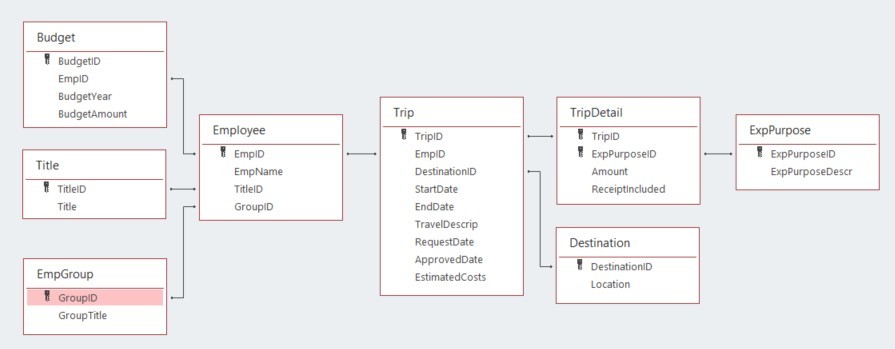
The following are descriptions of each of the fields contained in the database. Fields are separated by table. The ID fields (i.e., BudgetID, TitleID, GroupID) are not separately defined; they comprise integers that uniquely identify the rows in each table. Each ID field functions as a primary or foreign key for the database.
Budget:
BudgetYear: the four-digit year that corresponds to the annual budget year for an employee
BudgetAmount: an employee’s annual budget amount
Title:
Title: a description of each employee title
EmpGroup:
GroupTitle: a description of each employee group
Employee:
EmpName: the first and last names of each employee
Trip:
StartDate: the beginning date for employee travel
EndDate: the ending date for employee travel
TravelDescript: a description provided by the employee of their travel
RequestDate: the date an employee requested permission to travel
ApprovedDate: the date a supervisor approved the employee’s travel
EstimatedCosts: the employee’s estimated amount the trip would cost made at the time they requested permission to travel
TripDetail:
Amount: the dollar amount of costs for the employee incurred for each purpose on each trip
ReceiptIncluded: a dummy variable that is equal to “Y” if the employee included a receipt and “N” if the employee did not include a receipt.
Destination:
Location: a country description of the primary location for the travel (While employees can travel to multiple locations on a trip, only the first destination of the trip is recorded.)
ExpPurpose:
ExpPurposeDescr: a description of each category of employee expenses
Your audit
The auditing questions you will answer relate to three themes:
The proper inclusion of receipts for travel expenditures
The approval of travel
The proper documentation of expenditures
The policies of the Canadian government require a receipt to be submitted for all travel expenditures. The regulations also require that all travel be approved before the start of a trip and that all filed documentation includes complete information (i.e., submitted reimbursements must include all dates, details, names, purposes). You will be examining government employees’ observance of these regulations.
Required
Your task is to answer each of the following questions using the Microsoft Access file provided for this case and submit the answers in a Word document for grading. Save your document as OhCanada3_FirstNameLastName.docx. As you answer the questions, make sure to:
Carefully label the output columns as specified in the images.
Include the columns in the order specified in the images of the output header shown in each problem.
Sort the data as specified in the problem.
List the number of rows returned from executing the query.
The SQL for all of these problems will start with a SELECT statement and end with a semicolon.
For how many transactions is a receipt not included? Consider a transaction as each line item in the TripDetail table. The output header should look like this:

SQL:
Number of rows:
For the transactions with missing receipts in the previous problem, list the transactions for follow-up testing. The list should have the information noted in the image below. Sort the data by amount (ascending) and then by employee name (ascending). The output header should look like this:

SQL:
Number of rows:
The number of transactions from the previous query is still too many to audit given your audit budget. Reduce the list to only look at transactions that have a start date in 2020 or that are over $10,000. Sort the data by amount (ascending) and then by employee name (ascending). The output header should look like this:
SQL:
Number of rows:
To improve the documentation compliance of the client, you want to provide a list to the client of the groups that would most benefit from training on documentation policies. Create a list that shows the name of the groups and the number of missing receipts that each group had in both 2019 and 2020 (using the trip start date for the year). Count the transactions in both years. Do not separately report the number of transactions by year. Sort the data by the number of missing receipts (descending) and then by the group’s title (ascending). The output header should look like this:

SQL:
Number of rows:
How many trips were taken without trip approval (i.e., the ApprovedDate field in the Trip Table is empty)? Do not sort the data. The output header should look like this:

SQL:
Number of rows:
List the names of employees and the number of unapproved trips for employees who had unapproved trips. Sort the data so that employees with more missing approvals are listed first, and list them alphabetically by employee name if there are any ties. The output header should look like this:

SQL:
Number of rows:
By year, how many trips were taken where the trip was approved after it had begun? Do not sort the data. The output header should look like this:

SQL:
Number of rows:
You are particularly concerned about international trips that were approved after their start date. Create a list of trips to places outside Canada that were approved after their start date. Sort the data by location (descending) and then by employee name (ascending). The output header should look like this:

SQL:
Number of rows:
Based on what you observed in question 8., what do recommend to the client?
Another important area for audit investigation is documentation that is not complete. Write three questions that can be answered with this data about documentation completeness. Then, write the queries to answer your questions. Write a short summary of what you conclude based on your analysis.